Error Analysis to Evaluate LLM Applications
A practical guide to identifying, categorizing, and analyzing failure modes in LLM applications using Langfuse.
 Jannik Maierhöfer
To improve your LLM app, you must understand how it fails. Aggregate metrics won't tell you if your system retrieves the wrong documents or if the model's tone alienates users. Error analysis provides this crucial context.
The framework in this guide is adapted from Hamel Husain's Eval FAQ.
This guide describes a five-step process to identify, categorize, and quantify your application's unique failure modes. The result is a specific evaluation framework that is far more useful than generic metrics:
- Gather a diverse dataset of traces
- Open code to surface failure patterns
- Structure failure modes
- Label and quantify
- Decide what to do
Want the full step-by-step guide? This post explains the framework. The companion cookbook walks through every step in Langfuse — score configs, queue setup, clustering, dashboards, and a worked example end-to-end.
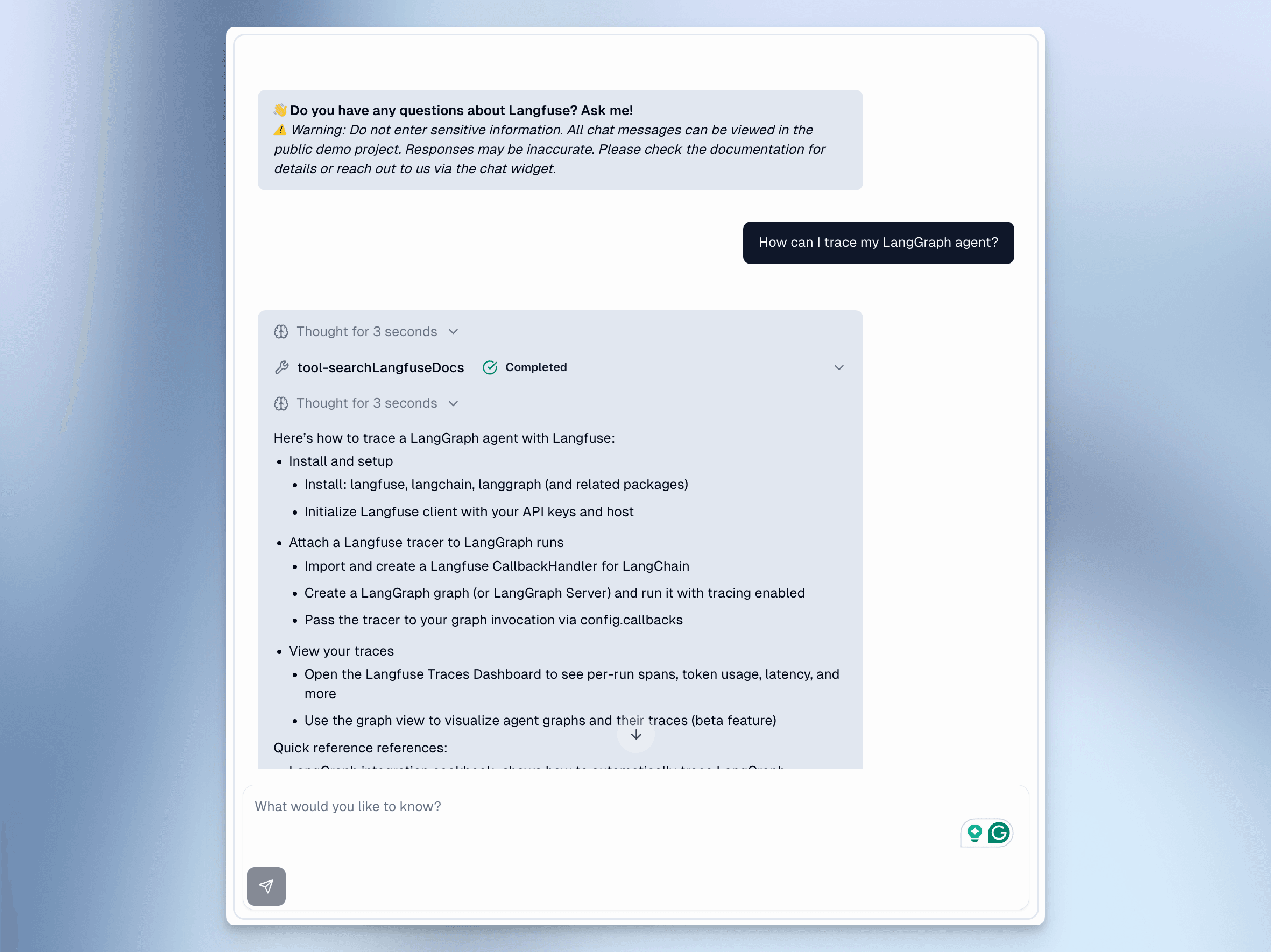
I'll demonstrate this process using an example chatbot in the Langfuse documentation that uses the Vercel AI SDK and has access to a RAG tool to retrieve documents from the Langfuse documentation. The example chat app logs traces into the Langfuse example project and has already answered 19k user queries in the past year.
Here's the chat interface (you can find the example chat app here):
1. Gather a Diverse Dataset
To start our error analysis, we assemble a representative dataset of 50-100 traces produced by the example chat app. The quality of your analysis depends on the diversity of this initial data.
Existing Production Traces: If you already have real user traces, as in our example, create your dataset based on them. I recommend first manually clicking through your traces, focusing only on the user input, and adding a diverse set of traces to an annotation queue.
You can also query for traces with negative user feedback, long conversations, high latency, or specific user metadata. The goal is not a random sample, but a set that covers a wide range of user intents and potential edge cases.
In Langfuse, you can bulk add traces to an annotation queue or a dataset by clicking the "Actions" button:
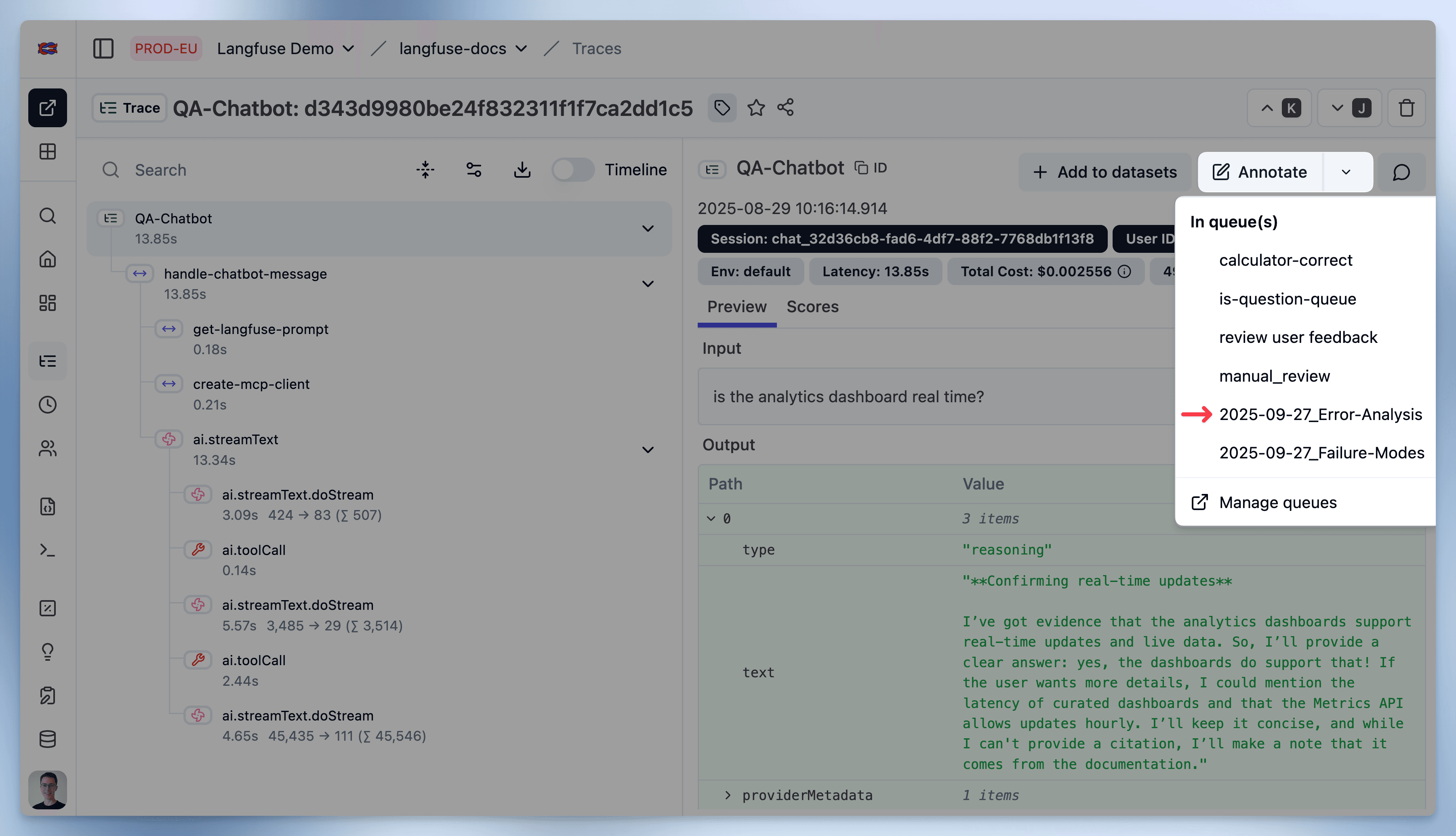
Synthetic Dataset: If you lack production data, generate a synthetic dataset covering anticipated user behaviors and potential failure points. We have a Python cookbook that shows how to do this here. Once created, add these traces to a Langfuse Annotation Queue. Note that the quality of your dataset matters a lot for the success of your error analysis; it needs to be diverse and representative of the real world.
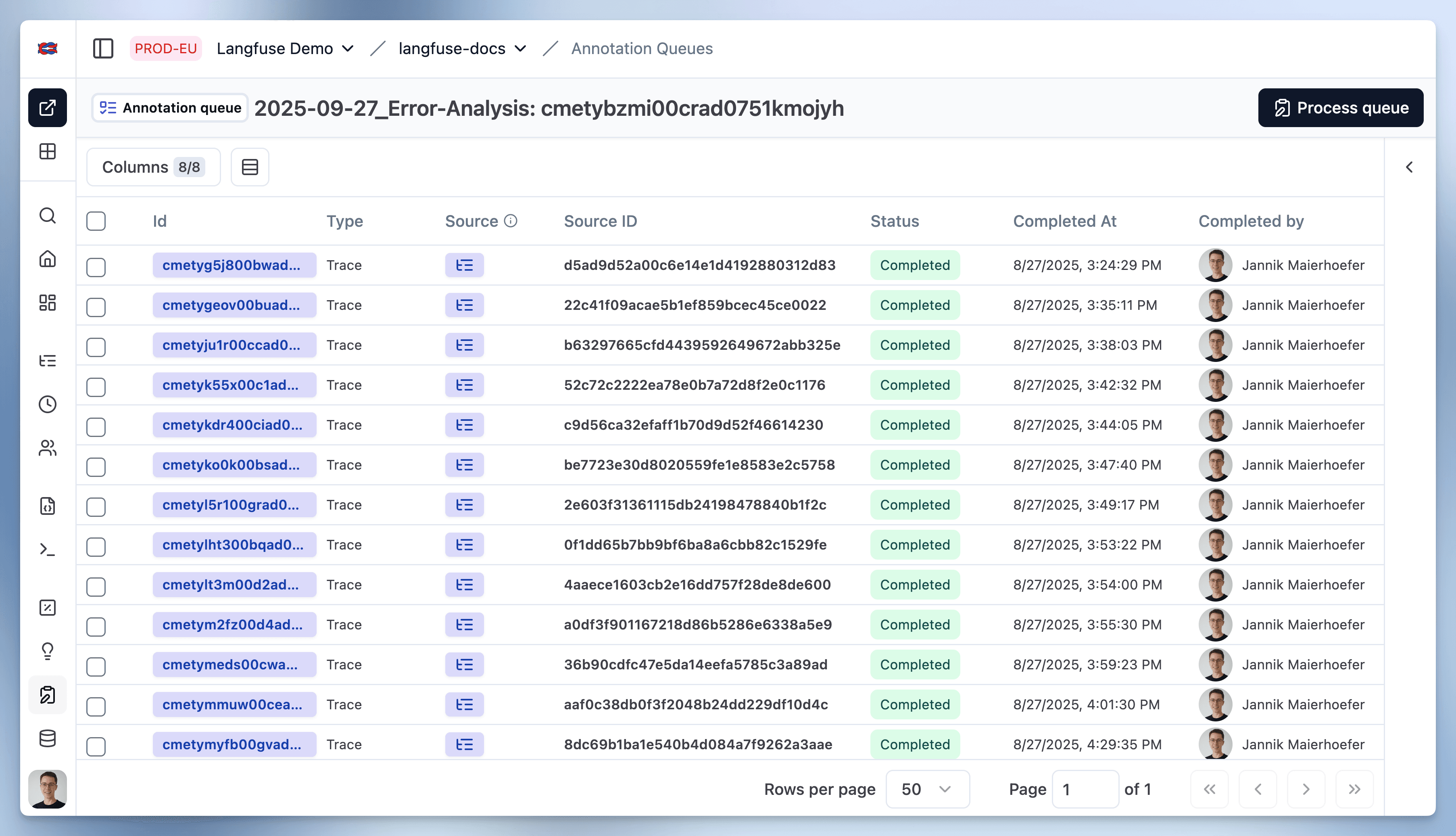
The Annotation Queue we created will serve as your workspace for the analysis. For our example chatbot, we selected 40 traces reflecting different user questions, from simple definitions to complex comparisons:
2. Open Coding: Surface Failure Patterns
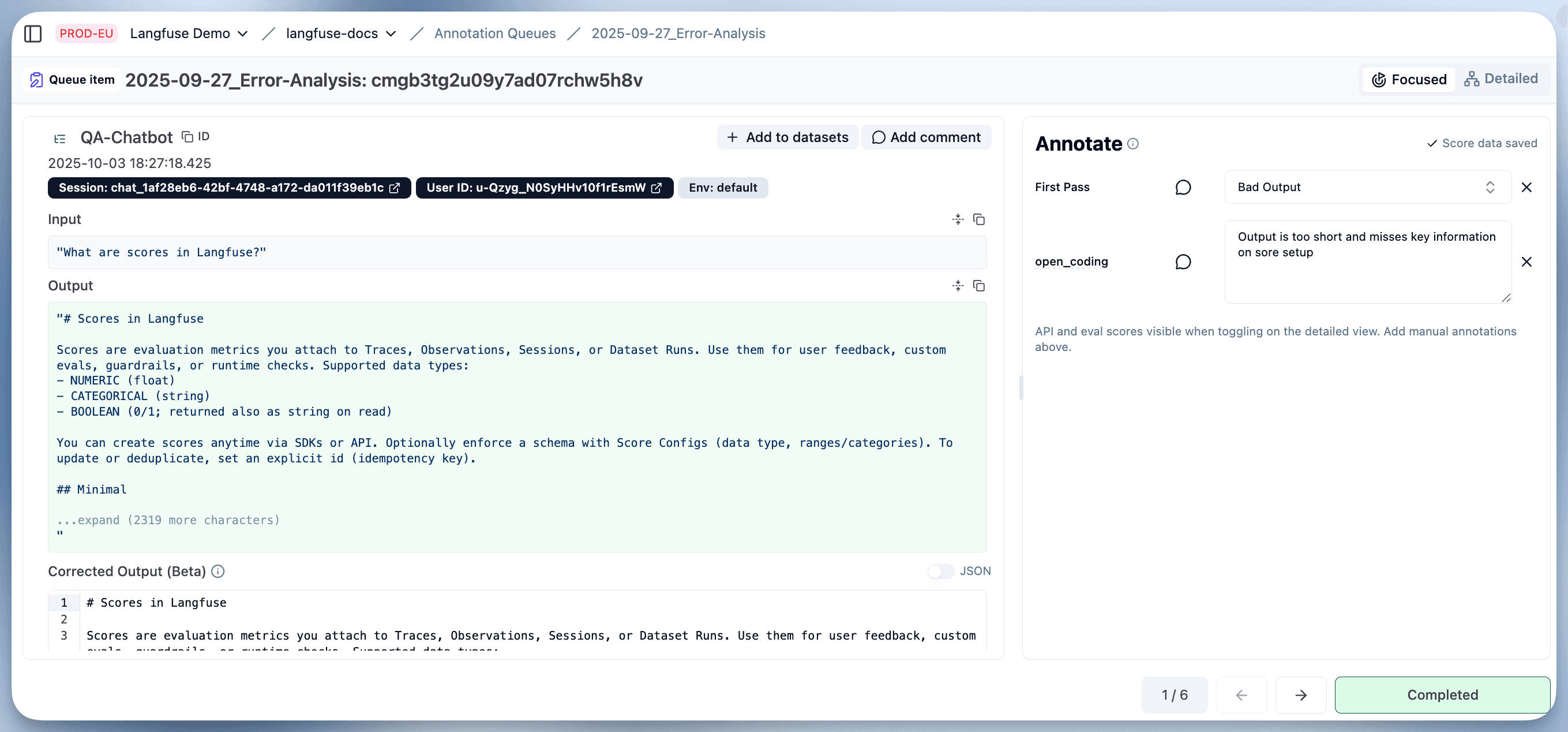
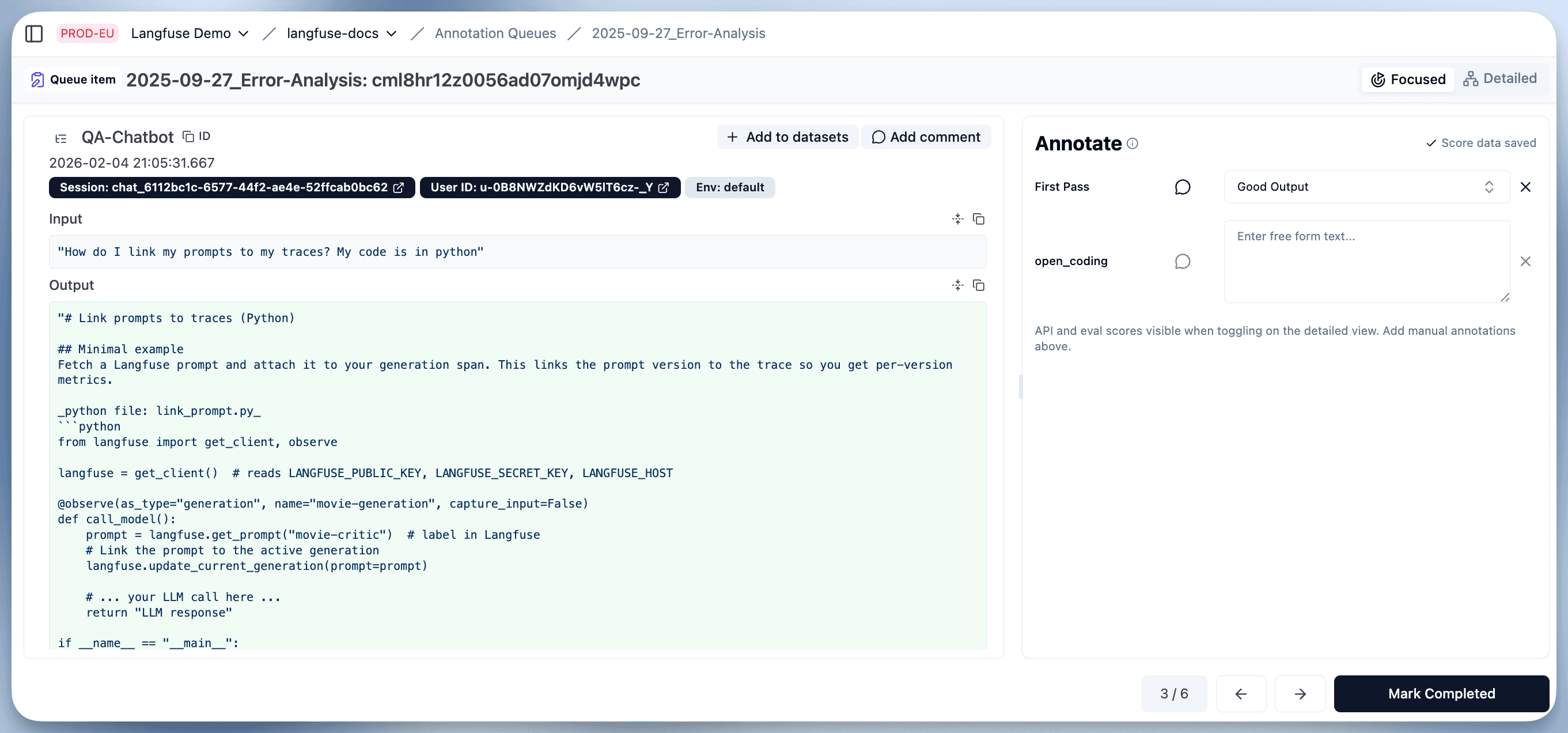
In the next step, we open our Annotation Queue and carefully review every trace and its associated tool use. The objective is to apply raw, descriptive labels without forcing them into predefined categories.
Set up two score configs in Langfuse (Settings → Scores → Create) and add both to your annotation queue:
-
A categorical Pass / Fail score. This forces a clear judgment call.
-
A free-text score (data type
TEXT) describing the first point of failure you observe. This process is called open coding — we are not forcing any categories on the data.
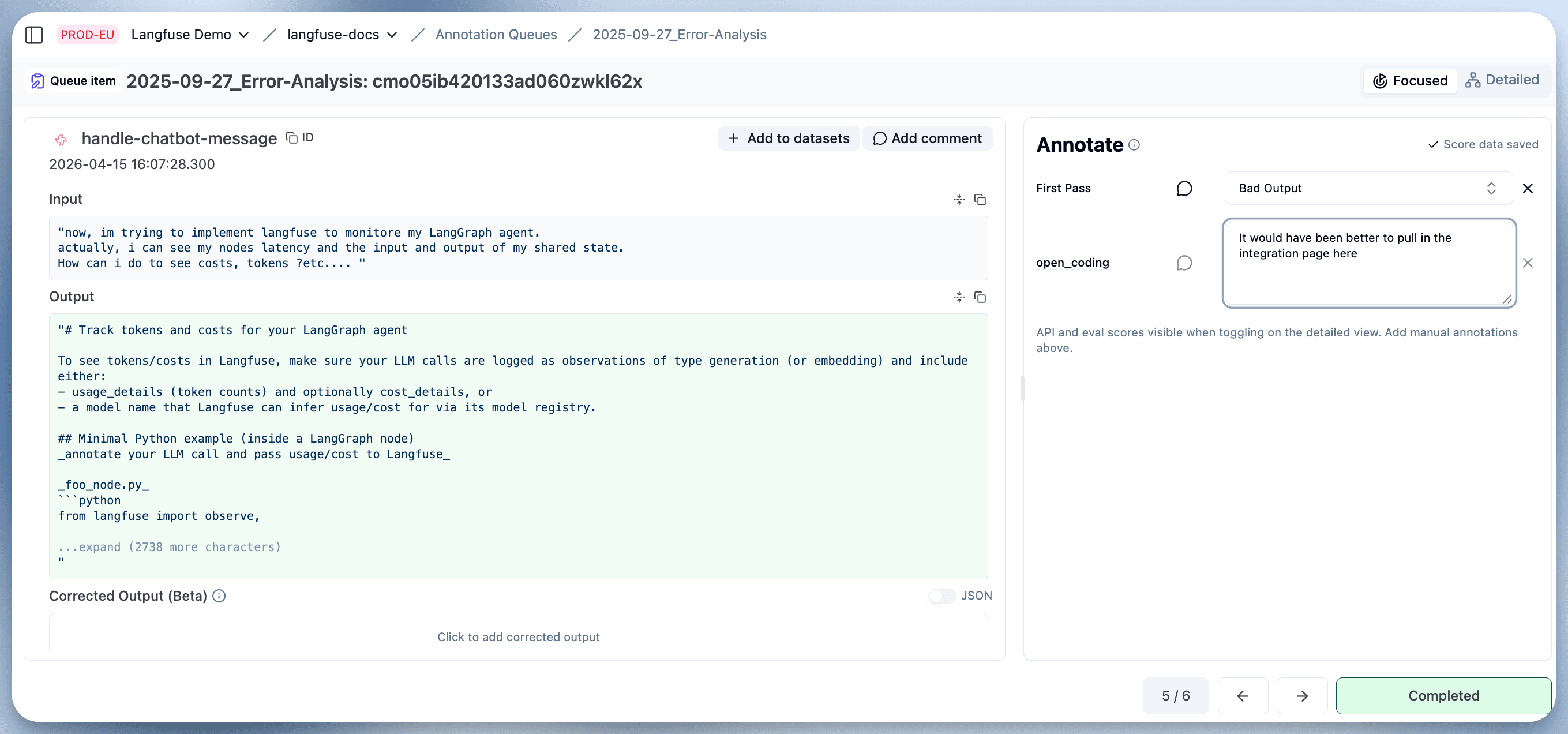
If you have traces with multiple errors, focusing on the first failure is efficient. A single upstream error, like incorrect document retrieval, often causes multiple downstream issues. Fixing the root cause resolves them all. Your free-text observation should be a raw description, not a premature diagnosis.
Here are some examples from our example chat app:
3. Structure Failure Modes
After annotating all traces, the next step is to structure your free-text observations into a coherent taxonomy.
Export the values of your free-text score from the Langfuse annotation job (you can query scores via the Langfuse API). You can use an LLM to perform an initial clustering of these notes into related themes. Review and manually refine the LLM's output to ensure the categories are distinct, comprehensive, and accurately reflect your application's specific issues.
For our docs chatbot, we used the following prompt on our exported annotations:
You are given a list of open-ended annotations describing failures of an LLM-powered assistant that answers questions about Langfuse. Organize these into a small set of coherent failure categories, grouping similar mistakes together. For each category, provide a concise descriptive title and a one-line definition. Only cluster based on the issues in the annotations—do not invent new failure types.
This produced a clear taxonomy:
| Failure Mode | Definition |
|---|---|
| Hallucinations / Incorrect Information | The assistant gives factually wrong answers or shows lack of knowledge about the domain. |
| Context Retrieval / RAG Issues | Failures related to retrieving or using the right documents. |
| Irrelevant or Off-Topic Responses | The assistant produces content unrelated to the user’s question. |
| Generic or Unhelpful Responses | Answers are too broad, vague, or do not directly address the user’s question. |
| Formatting / Presentation Issues | Problems with response delivery, such as missing code blocks or links. |
| Interaction Style / Missing Follow-ups | The assistant fails to ask clarifying questions or misses opportunities for guided interaction. |
4. Label and Quantify
With our error labels in place, we can now annotate our dataset with these failure modes.
First, create a new Score configuration in Langfuse containing each failure mode as a boolean or categorical option. Then, re-annotate your dataset using this new, structured schema.
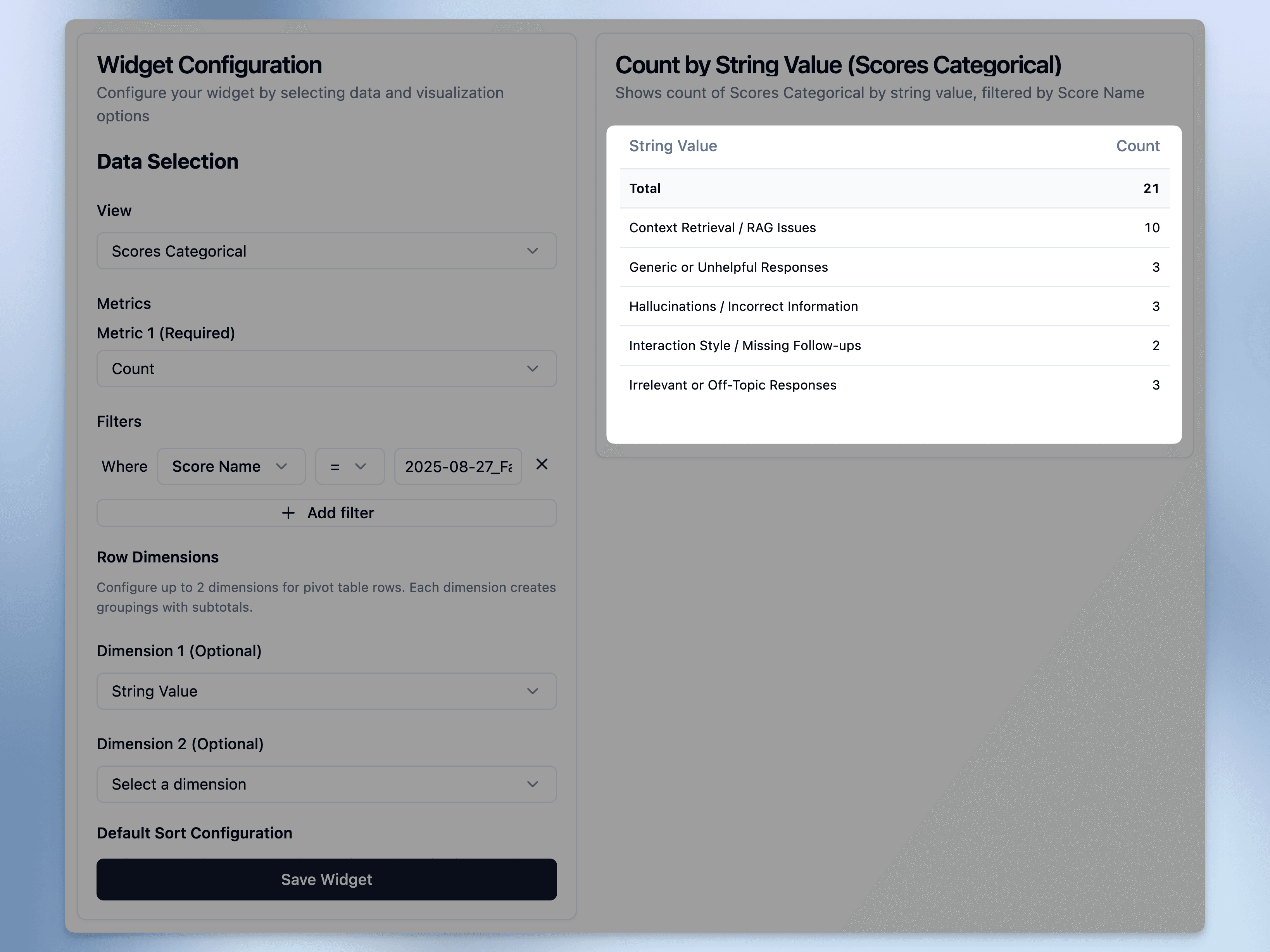
This labeled dataset allows you to use Langfuse analytics to pivot and aggregate the data. You can now answer critical questions like, "What is our most frequent failure mode?" For our example chatbot, the analysis revealed that Context Retrieval Issues were the most common problem.
Here are the results after labeling our dataset:
5. Decide What to Do
Error analysis without a decision is just documentation. For each failure category, work through three questions in order.
Can you just fix it? Some failures have obvious remedies that don't need an evaluator. Missing prompt instruction: add it. Contradicting instructions: resolve the conflict. Misconfigured or missing tool: fix the tool. Engineering bug: fix the code. Fix first. Don't build an evaluator for something a prompt change would have prevented.
Is an evaluator worth building? Not every remaining failure justifies one. Ask: how often does it happen? What's the cost when it does? Will someone actually iterate on this metric? A failure at 3% with no business impact can wait.
What kind of evaluator? Objective failures (format, length, string presence) call for code-based checks. Failures requiring judgment (tone, relevance, missed follow-ups) call for LLM-as-judge. Safety or compliance requirements call for a guardrail, even after the underlying fix.
Langfuse has a built-in online evaluation feature that runs LLM judges automatically on new traces, worth checking before writing anything custom.
Applied to the taxonomy from Step 3, our docs chatbot decisions look like this:
| Category | Rate | Decision | Rationale |
|---|---|---|---|
| Context Retrieval / RAG Issues | high | Fix retrieval pipeline | Root cause is upstream. An evaluator catches symptoms, not the problem. |
| Hallucinations / Incorrect Information | medium | LLM-as-judge | Requires judgment. High impact when it occurs. |
| Generic or Unhelpful Responses | medium | Prompt fix + LLM-as-judge | Some cases fixable with better instructions. Residual cases need monitoring. |
| Formatting / Presentation Issues | low | Code-based check | Objective and easy to automate. |
| Irrelevant / Off-Topic Responses | low | LLM-as-judge | Rare but high impact. |
| Interaction Style / Missing Follow-ups | low | Monitor | Low rate. Watch before committing to an evaluator. |
Common Pitfalls
-
Generic Metrics: Avoid starting with off-the-shelf metrics like "conciseness" or "hallucinations." Let your application's actual failures define your evaluation criteria.
-
One-and-Done Analysis: Error analysis is not a static task. As your application and user behavior evolve, so will its failure modes. Make this process a recurring part of your development cycle.
Next Steps
This error analysis produces a quantified, application-specific understanding of your primary issues. These insights provide a clear roadmap for targeted improvements, whether in your prompts, RAG pipeline, or model selection.
The structured failure modes you defined serve as the foundation for building automated evaluators. Not every category warrants one though: fix the obvious gaps directly (missing or contradicting prompt instructions, misconfigured tools, engineering bugs), and set up evaluators for what remains — code-based checks for objective criteria, LLM-as-judge for ones requiring judgment. You can typically go through multiple rounds of this process before reaching a plateau.
In the next blog post, we will set up automated evaluators and use them to continuously improve our example chatbot:
Dive Deeper
For a hands-on, step-by-step walkthrough of the entire workflow — from selecting a representative sample to setting up score configs, clustering observations, and computing failure rates in a Langfuse dashboard — see the companion cookbook:
Or let your coding agent guide you through it. Paste this prompt into Claude Code (or any coding agent) and the Langfuse skill will run every step alongside you:
I want to do a systematic error analysis of my LLM application to understand how it fails.
Please install the Langfuse skill (https://github.com/langfuse/skills/tree/main/skills/langfuse)
and the Langfuse CLI (https://github.com/langfuse/langfuse-cli), then guide me step by step
through error analysis.